Client portal
Your clients check their own sites, so they stop ringing you to ask.
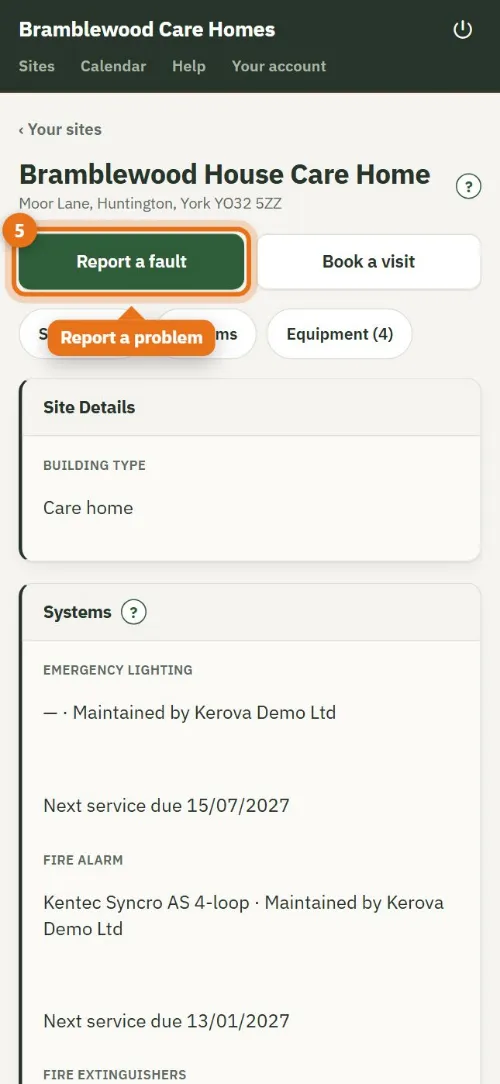
Invite a client and they get their own page: every site, what's due and overdue, certificates to sign and download, quotes to approve, invoices, and a Report a fault button that lands in your callouts.
What it does
The client portal, in practice
Only their own sites
Each client signs in with the email you invited and sees only their own sites. They can't change your records or see anyone else's.
What needs them, at the top
A quote to answer, a certificate to sign or an invoice to pay is listed first, with one button for each.
Sign on screen
Clients read and sign certificates in the portal. Until they sign, the certificate says it hasn't been signed by the client, and they can't download it.
Report a fault
The client says what happened and you see it straight away under Callouts, ready to reply and book a visit.
Their logbook, on their phone
The weekly fire alarm test, the monthly emergency lighting test and false alarms, logged in a few taps. Your engineer sees it on the next visit.
Everything to download
Certificates (each with its QR check), the plans, their equipment list and a compliance pack for their insurer, whenever they need them.
What it means for your office
Fewer "can you resend the certificate?" emails, quotes answered with a tick instead of a phone call, and faults that arrive written down with the site already attached. The portal comes with every Kerova account, at no extra cost, and clients don't need to install anything: it opens in their browser on a phone or computer.
- Book a visit: clients ask for a visit when a system is due; the office books it.
- How to pay: invoices show the amount, your bank details and the reference.
- A short welcome walks a new client round the portal in a minute, and they can skip it.
- Plain words: Overdue, Action needed, Due soon or Up to date on every site.
Questions
Common questions
Do clients have to pay for the portal?
No. It is part of your Kerova account, and you choose which clients to invite.
Can a client change a certificate?
No. The portal is read-only, apart from signing, answering quotes, logging their own tests and reporting faults.
Can a client with several sites see them all?
Yes. A client with many sites sees all of them on one page, each with its own status.
Do clients need an app?
No. It opens in the browser on their phone or computer. They can add it to their home screen if they want.
More of what Kerova does
Zone plans and as-fitted drawings
Drawn once, on every certificate.
Read more →Quotes and invoicing, with Xero
From a defect to a paid invoice.
Read more →For one-man bands and small firms
Less paperwork in the evenings.
Read more →Switching from paper or spreadsheets
Your sites brought across in days.
Read more →Nine disciplines
A proper certificate for each system you look after.
See them all →Ready when you are
Give your clients their own portal, free for a month.
Start a free trial and we set your company up, or get in touch with a question.
First month free · no card · we help you set up