Quotes and invoicing, with Xero
From a failed detector to a paid invoice, without retyping anything.
When a certificate is signed, everything that failed becomes a repair. Quote it from your price list, the client approves it with one tap, and the invoice goes to Xero by itself.
What it does
Quotes and invoicing, in practice
Repairs made for you
Failed devices, condemned extinguishers, lights that didn't last and batteries past their age become repairs when the certificate is signed, each linked to the certificate.
Quotes from your price list
Pick your saved parts and labour rates, or type a line. Net, VAT and the total are worked out as you go.
Approved with one tap
The client gets the quote as a PDF with your logo and Accept and Decline buttons that work without logging in, or answers it in their portal.
Discounts done properly
A percentage or fixed amount off the whole quote or one line, with a reason the client sees, before VAT.
Invoices from anything
Raise an invoice from a job, a callout, a service visit or an approved quote, or start a blank one. Part payments and payment plans are tracked.
Xero, one way
Connect Xero once and every invoice you send is created there too, with payments if you choose. Kerova can't see your accounts.
Contracts and regular visits
For a site on a service contract, Kerova raises one invoice per visit, or monthly if that's how the contract works. Service reminders go out before each visit is due, so the work and the invoice both turn up on time.
- Your bank details print on every invoice and go in the email.
- Works without Xero: invoice from Kerova and download the PDF.
- Sent with no signal: marked sent now, emailed when you're back in range.
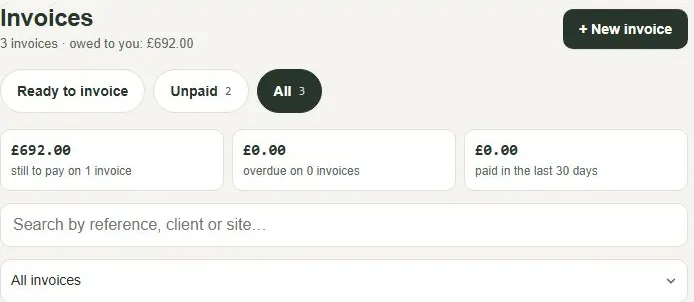
- One list: Unpaid, Part paid, Overdue and Paid, with totals at the top.
Questions
Common questions
Do I need Xero?
No. Invoices work on their own and you can download the PDF. If you use Xero, connecting it means you don't type invoices in twice.
Does a payment in Xero come back to Kerova?
Not at the moment: it goes one way, from Kerova to Xero. Record the payment in Kerova and, with a Xero bank account chosen, it is recorded in Xero too.
How do clients pay?
Each invoice shows the amount, your bank details and the payment reference, in the email, the PDF and the client's portal.
Can I quote for new work, not just repairs?
Yes. Start a quote for anything, for any client and site.
More of what Kerova does
Zone plans and as-fitted drawings
Drawn once, on every certificate.
Read more →Client portal
Clients see, sign and report faults.
Read more →For one-man bands and small firms
Less paperwork in the evenings.
Read more →Switching from paper or spreadsheets
Your sites brought across in days.
Read more →Nine disciplines
A proper certificate for each system you look after.
See them all →Ready when you are
Quote and invoice from the same app, free for a month.
Start a free trial and we set your company up, or get in touch with a question.
First month free · no card · we help you set up