Fire alarm certificate software · BS 5839-1
Fire alarm certificate software for BS 5839-1: filled in on site, checked by anyone.
Design, installation, commissioning, takeover and periodic servicing certificates with the zone register, meter readings and battery sizing built in — and a compliance verdict computed from what you actually tested.
Certificate types: Design · Installation · Commissioning · Takeover · Periodic Inspection & Servicing · Alteration / Modification
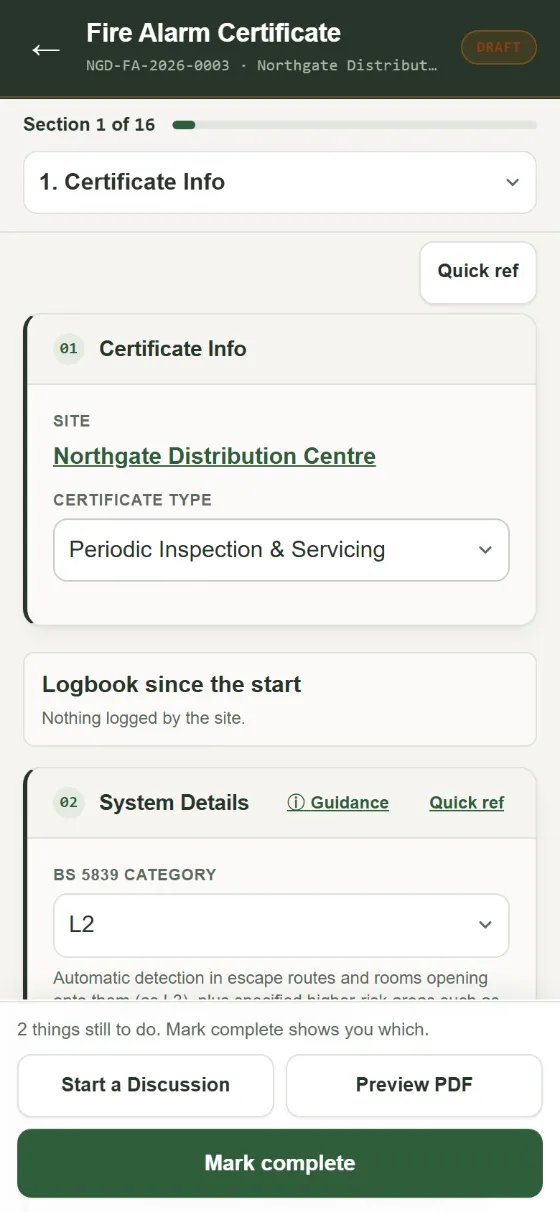
On the certificate
What the fire alarm certificate records
System category recorded
L1–L5, M, P1 and P2 with the category justification captured on the certificate, so the design intent travels with every later visit.
Meter readings with the maths done
Mains, standby and charger readings plus quiescent and alarm currents — standby battery capacity is calculated to the BS 5839-1 method automatically.
ACT meter discharge tests
Enter rated and measured Ah per battery and the percentage is worked out; batteries under 65% or over four years old are flagged.
Sound pressure levels
SPL readings per area with the pass threshold applied for you, on the periodic and commissioning certificates.
False alarm rate review
Twelve-month false alarm count against detector count, checked against the review thresholds.
Periodic servicing checklist
Every routine check from the panel clock to the log book, with fails turned into defects in one tap.
On site
A fire alarm visit on your phone, start to finish
- Open the site. Today's visit is on the engineer's phone with the system, the zones and last visit's results already filled in.
- Put it on test. One tap puts the system on test with the alarm receiving centre: the ARC's number and account are on the screen to call.
- Test the zones. Mark each zone and device as you go; the 25% rotation is there from last time, and a failed device becomes a defect with a photo.
- Readings and battery. Type the panel readings and the standby battery sum is worked out to the BS 5839-1 method.
- Sign and send. The client signs on your screen or in their portal, the certificate locks, and a repair and a draft quote are waiting for the failed items.
No signal? Everything saves on the phone and sends when you're back in range. Once it's signed, anyone can scan the QR code on the certificate to check it's genuine, and the client finds it in their portal with what's due next.
A fire alarm service sheet app that finishes the certificate too
Most firms still do the service on a paper sheet and type the certificate up later. In Kerova the service sheet is the certificate: a BS 5839 certificate app on the engineer's phone, filled in from last visit's zones and panel details, with the battery sum done, fails turned into defects and the client's signature taken on site.
- Zones and devices carried over from the last visit, so the engineer checks rather than types.
- Service, commissioning, installation and modification certificates from the same records.
- Works with no signal in a plant room or basement; it sends when you are back in range.
- The zone plan prints on the certificate, with each device marked passed or failed: see fire alarm zone plan software.
The same on every discipline
One app for the certificate, the client and the invoice.
- ✓ Locked when signed, changes make a new revision, and anyone can check it by its QR code without logging in
- ✓ A client portal with what's due, signing on screen and fault reporting
- ✓ Failed items become repairs, then a quote and an invoice, sent to Xero
- ✓ Devices on a zone plan or as-fitted drawing that prints with the certificate
- ✓ Works with no signal in a plant room or basement: it saves on the phone and sends when you're back in range
- ✓ Service reminders go out for you, to you and the client
Related guides
What goes on a BS 5839-1 service certificate
GuideBS 5839-1 testing intervals: weekly, monthly, six-monthly and annual
GuideBS 5839-1:2025: what's changed for installers
GuideHow many smoke detectors does a room need?
GuideHow to work out a fire alarm battery size
GuideFire alarm categories: L1 to L5, M, P1 and P2 explained
GuideHow far apart can manual call points be, and how high do they go?
Free tools for fire alarm
Fire alarm battery calculator
Free calculatorFire alarm sounder circuit calculator
Free calculatorFire alarm loop resistance calculator
Free calculatorFire alarm detector spacing calculator
Questions
Fire Alarm in Kerova
Does Kerova decide the pass/fail?
The overall verdict is worked out from the zone results, checklist outcomes and defect severities you record, not a judgement call. You can still change an individual defect's severity, and that change is recorded.
Can I carry over zones from the last visit?
Yes. A new service certificate fills in the zone register and panel details from the last one on that system, so the engineer checks rather than types.
What about the weekly user test?
The site can log it in the logbook in their client portal (which call point, sounders working, signal to the ARC), and the engineer sees the logbook on the next service certificate.
Does it work with no signal?
Yes. The certificate saves on the phone as you go, signatures included, and sends when you're back in range. A badge at the top says how many things are waiting to upload.
Other disciplines
Intruder Alarm
See the certificate →BS 5266-1Emergency Lighting
See the certificate →BS 5306-3Fire Extinguishers
See the certificate →BS EN 62676-4CCTV
See the certificate →BS EN 60839-11-1Access Control
See the certificate →BS 8214Fire Doors
See the inspection report →BS EN 12101AOVs and Smoke Vents
See the certificate →IET Code of PracticePAT Testing
See the record →Every discipline is part of the same fire and security software: one account, one price for the firm.
Ready when you are
Fire alarm certificates on your own sites, free for a month.
Start a free trial and we set your company up, or get in touch with a question.
First month free · no card · we help you set up