Fire door inspection app · BS 8214
Fire door inspection app: BS 8214 inspections, one door at a time on your phone.
Go round the building door by door: gaps, seals, hinges, closer, glazing and signage, each a pass, fail or advisory in one tap. The report builds itself, with a door schedule, photos and the overall result.
Paperwork: Fire door inspection report (periodic, or initial inspection / survey)
On the inspection report
What the fire doors inspection report records
A door register that carries forward
Door ref and tag, location, rating (FD30, FD30S, FD60, FD60S, FD90 or FD120), single or double, leaf material, size, label or plugs, manufacturer and door type. Recorded once, then checked rather than retyped next time.
One door at a time
"Door 14 of 30" with Next door and Previous door, and an On plan button that opens the plan at that door. Each part of the door is a short card, folded away once it's done.
Gaps measured, not guessed
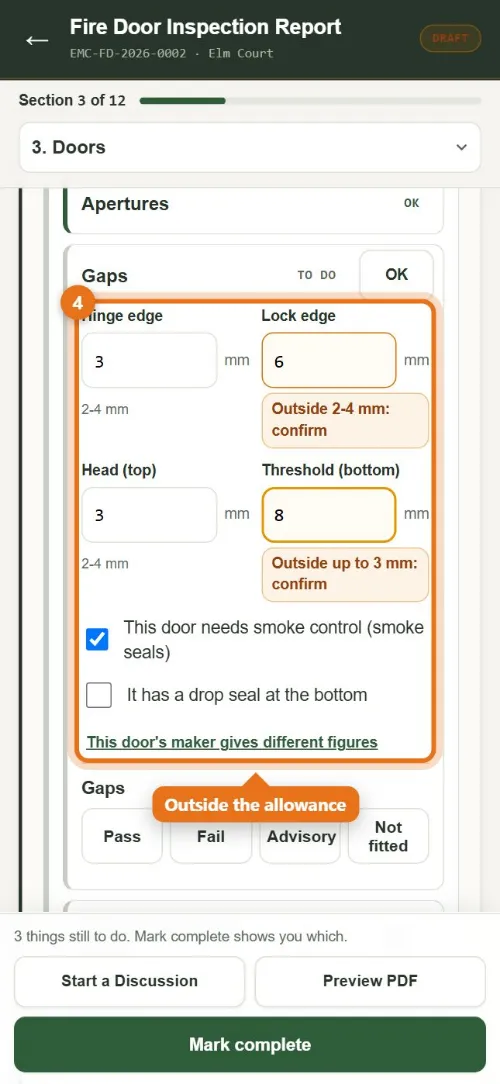
Hinge edge, lock edge, head, meeting edges and threshold in millimetres. Your firm sets the allowances; a gap outside them is flagged for the engineer to confirm.
Every part of the door
Leaf and frame, certification label, signage, glazing, apertures (letter plates, vents, spy holes), gaps, strips and smoke seals, hinges, closer, hold-open device, handles, panic hardware, latch and lock, and how the door works.
Doors you couldn't get to
Mark a door not accessed (locked, occupied, refused) and it is listed on the report without holding the report up.
Failed doors become repairs
Each failed item becomes a repair ("Door FD-14: repair or replace the closer (leaking oil)"), and the draft quote picks them all up. Photos of the fault print on the report.
On site
A fire doors visit on your phone, start to finish
- Open the site. The door register is there, door by door, with each door's rating and location.
- One door at a time. "Door 14 of 30": tap through leaf, frame, seals, hinges, closer, glazing and signage.
- Measure the gaps. Type the gaps in millimetres; anything outside your allowance is flagged for you to confirm.
- Photos. A photo of each fault goes straight onto the report.
- Sign and send. The report builds itself with the door schedule, and each failed door is a repair on a draft quote.
No signal? Everything saves on the phone and sends when you're back in range. Once it's signed, anyone can scan the QR code on the inspection report to check it's genuine, and the client finds it in their portal with what's due next.
How often each door is due
Kerova works out each site's next inspection from its doors: communal doors in residential buildings over 11 m every 3 months and flat entrance doors every 12 months, as the Fire Safety (England) Regulations 2022 set out, and other fire doors every 6 months unless you set something different for the site. The report names the legislation and BS 8214 without quoting them, and gives one of three plain results: Satisfactory, Satisfactory with advisories, or Unsatisfactory – repairs needed.
The same on every discipline
One app for the inspection report, the client and the invoice.
- ✓ Locked when signed, changes make a new revision, and anyone can check it by its QR code without logging in
- ✓ A client portal with what's due, signing on screen and fault reporting
- ✓ Failed items become repairs, then a quote and an invoice, sent to Xero
- ✓ Devices on a zone plan or as-fitted drawing that prints with the inspection report
- ✓ Works with no signal in a plant room or basement: it saves on the phone and sends when you're back in range
- ✓ Service reminders go out for you, to you and the client
Related guides
What makes a fire or security certificate compliant?
GuidePaper certificates vs digital: what actually changes
Free tools that help
Fire and security glossary
Free referenceUK fire and security standards: current editions
Free finderWhich certificate do I need?
Questions
Fire Doors in Kerova
Does a gap outside the allowance fail the door?
No. It is flagged for the engineer to confirm, and the engineer chooses Pass, Fail or Advisory. The allowances are your firm's own, set once in Settings, and a door can use the maker's figure instead.
What does the client get?
A fire door inspection report with a front page (site, date, what was checked, the counts and the summary), the door schedule, then each door in turn with its results, gap measurements, issues and photos. It is in their portal; your engineers scan a door's QR tag to open its history.
Can we put the doors on a plan?
Yes. Doors go on the zone plan like any other device: a door that passes shows green and a door that fails shows red.
Other disciplines
Fire Alarm
See the certificate →PD 6662 / BS EN 50131Intruder Alarm
See the certificate →BS 5266-1Emergency Lighting
See the certificate →BS 5306-3Fire Extinguishers
See the certificate →BS EN 62676-4CCTV
See the certificate →BS EN 60839-11-1Access Control
See the certificate →BS EN 12101AOVs and Smoke Vents
See the certificate →IET Code of PracticePAT Testing
See the record →Every discipline is part of the same fire and security software: one account, one price for the firm.
Ready when you are
Fire doors inspection reports on your own sites, free for a month.
Start a free trial and we set your company up, or get in touch with a question.
First month free · no card · we help you set up